Posts

Unity Tutorial 03

Image
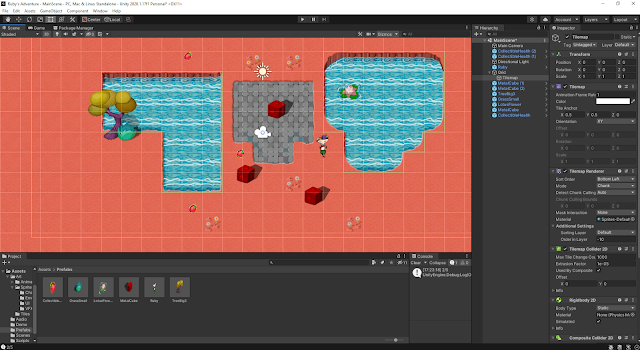
  (image from my unity editor) This week for my unity tutorials I moved on to adding collectibles and  then damage zones and enemies.  For the collectibles part I first gave Ruby a health stat and created new variables, I set Ruby's max health at 5. I then added a new sprite to act as a health collectible and gave it a box collider set as a trigger. Then I created a script for the health collectible to give health to Ruby and also adjusted Ruby's script so that it can check if Ruby needs health. If Ruby's health is at max it wont collect the health collectible. I then went ahead and added a damage zone and also took care of some of the graphics by tiling the sprites instead of stretching them so they look better. I also added enemies with rigid bodies and box colliders. I also created a new script for them called EnemyController. I then used OnCollisionEnter2D to be able to have Ruby take damage when colliding with enemies. I found these tutorials to be quite straight for...
Reading 03

Image
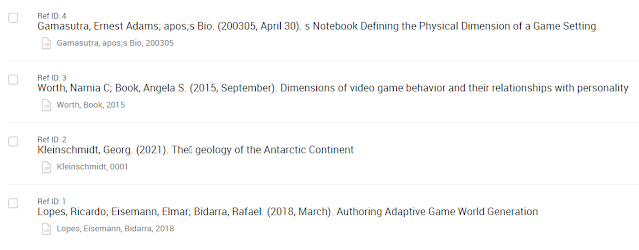
  (image taken from RefWorks of my 4 readings) This week for my reading that I had to find and select 4 academic papers on my topic, dimensions of a game world. I searched through quite a few papers and found 4 that I would focus on this week and saved them in RefWorks. I made sure to read the abstracts and conclusions so that the papers are relevant to my topic. I'm still finding it a little difficult to find some suitable papers but the ones I've found so far are similar enough to what I'm looking for. They are: Defining the Physical Dimension of a Game Setting - Ernest Adams Gamasutra Dimensions of video game behavior and their relationships with personality - Narnia C Worth, Angela S Book The Geology of Minecraft - Georg Kleinschmidt Authoring Adaptive Game World Generation - Ricardo Lopes, Elmar Eisemann and Rafael Bidarra I went through these 4 papers highlighting what I found to be important and commenting the main points I took from the papers. I then go...

Unity Tutorial 02

Image
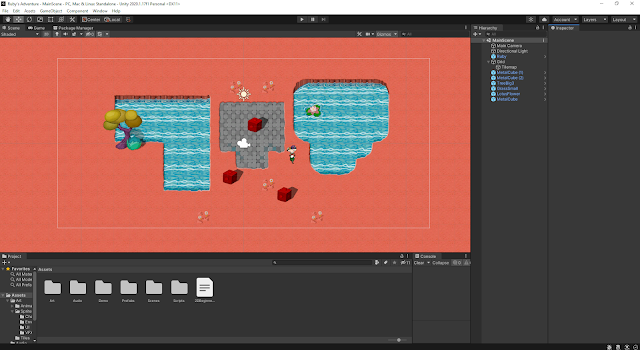
(image of my game in unity) This week for my unity tutorials I had a bit of extra work since I kinda slacked on my work last week so this week I had to catch up 😓 but overall I found the tutorials quite easy to start and go through and it was fun exploring the 2d side of Unity. I remember being interested in sprites and this type of game style a few years ago so I'm excited to learn how these game types are made and how to make my own.  Some of the things I've done so far are include setting up the unity editor to work in making a 2d game. I then went ahead and made my first character and script, character controller and keyboard input and then also worked on the world design, specifically the tile maps which i had to read over twice to get how to paint them on the map 😴 but I managed in the end.  Then I went on to decorate the world with more sprites and set colliders so that the character can interact and be blocked by certain objects.

Planning

Image
  (image  source ) For this week as part as our reading task we were introduced to how the TUD library search works and how to use it to find sources for our chosen topic. I found this very useful as it will make finding sources and reading much easier for my topic. My chosen topic for this game design and development book we all want to create together is "Dimensions of a game world", which would go under the chapter of "Game World".  Some of the Keywords that I found for this topic would be:  Dimension Data Map Navigation Scale These keywords were useful in searching journals, papers and books in the TUD Library search. After searching for some time I started to organize my finding using a matrix. I'm still not sure if I like the current matrix I'm using so I will probably look for a new one. I'm looking forward to learning more about how to create academic writing and use it well as it is a valuable skill to have especially in later studies when the c...

Tech Task Sidebar Box

 Hey guys! Just added a new html widget to my sidebar, a few words of wisdom 😂go check it out!

Unity Tutorial 08

Image
(image describing lesson 4.4,  source ) This week for our Unity Tutorials, I completed lesson 4.4. and had a shot at Challenge 4 In lesson 4.4 I started off by writing a for-loop to spawn 3 enemies as to challenge the player more and also gave it a parameter so that the number of enemies can increase as game goes on. I then wrote up some code to destroy enemies when they fall off and spawn a new wave once a wave is destroyed. I then increased the enemyCount so that the amount of enemies increase with each wave. To finalize the game I spawned powerups with each new wave to help the player. For challenge 4 I was given broken code for a game where the player controls a ball and has to get other balls in your net. Here are the problems with the code which I had to fix: - Hitting an enemy sends it back towards you - A new wave spawns when the player gets a powerup - The powerup never goes away - 2 enemies are spawned in every wave - The enemy balls are not movin...

Review Week Comments and Feedback

Image
  (image showing comment boxes,  source ) Reading through the feedback I have received through my blog comments I am quite happy and there is a lot of good quality in them! I find the comments that make me question more aspects of my game and also give me ideas. Reading through the comments I was inspired to add some things to my game like changing it up from subway surfers with a storm/tornado theme while also making the game winnable instead of just a high score. I also found it interesting that a few people are making a similar endless runner game and I'm happy to hear that some of the links and resources I've posted in my blog was helpful to them :) When it comes to me giving out feedback I believe I've done well so far and gave useful feedback. I really enjoy using the TAG method to give feedback where I tell, ask and give. I find it to be a great method as I can first appreciate something my colleagues have made and then also make them question aspects of their game a...