Posts

Doing

Image
  Image depicting reflection,  source In this weeks reading blog we are reflecting back over this semester. Overall for myselft, it wasn't the easiest or best semester. It wasn't that easy juggling all my modules and work at the same time and I feel like I should've given more time to this multimedia module, it was where my least focus was this semester and I do regret missing out on learning about and doing the reading tasks properly as they are a great skill to have. Nonetheless, I have to keep moving forward and I'm glad I was at least able to use this module to improve on my game development skills with Unity. This has helped especially with my group project as we were making a game. Looking over the book that the class has now completed, it was great to see the amount of detail gone into it and how everyone that really tried did improve on their academic writing skills. 
Reading 10

Image
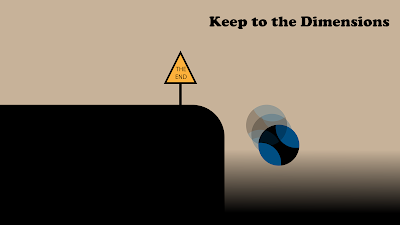
So I have finally gotten to making a reading task blog.. Yes, I know im very far behind on it and honestly feel like I've let myself down and could've tried that little bit more, but nonetheless, I'll try what I can for this last stretch. For this week's task I made two digital resources in forms of posters on my topic of the game world's dimensions and also an author's bio for my would be writing project. Image of my poster This first Poster shows the player, controlling a ball, falling of the platform. This shows what a game should not have unless on purpose (for example in mario), there should be a barrier set in place to not run the risk of the player falling in an area of nothingness and the player should also try to keep to the boundaries set in place. Image of my poster In in my second poster, I show a player that is stuck in a very small map with no indication of where to go, how to progress and is very limited in his/her movement. A game developer shoul...

Collage Tech Task

Image
  Tiger Collage Here is the collage I made this week for the tech task using  Fotor.com . Image sources: https://unsplash.com/photos/EiGBmms-alk?utm_source=unsplash&utm_medium=referral&utm_content=creditShareLink https://unsplash.com/photos/EiGBmms-alk?utm_source=unsplash&utm_medium=referral&utm_content=creditShareLink https://unsplash.com/photos/wgCr3eIfmaQ?utm_source=unsplash&utm_medium=referral&utm_content=creditShareLink https://unsplash.com/photos/wgCr3eIfmaQ?utm_source=unsplash&utm_medium=referral&utm_content=creditShareLink

Tutorial 07

Image
  (image of this weeks tutorial) I have finally reached the end of the Unity Tutorials with the last two tutorials being Audio and Build, Run, Distribute. For the Audio tutorial I first started by making an empty game object and adding an audio source to it. I added some looped music and set spatial blend to 2d so the sound can be heard everywhere. I then went on to one shot sound and added sound for when health is collected. I then added some spacilized sound to the robot. I then moved on to fixing attentuation by making a child gameobject to the camera and adding an audio listener to that.  The last tutorial was pretty straigh forward, I learned how to edit the player setting and set them up to how the tutorial showed me and then I built the game from the build settings. After it was built I played the .exe file and went on to try out the game I had made!

Tutorial 06

Image
(an image showing the title of the tutorial)  This week for my unity tutorials I learned about user interfaces and heads up displays as well as Dialog Raycast When learning about user interfaces and heads up displays, I first created a UI Canvas. I then learned about the rect transform which is like transform but with an ui element and I kept an overlay for the screen space. I then used the canvas scaler and set it to constant pixel size. I added an image to the ui and went to editing the ui , resizing my image, anchoring the image to the top corner. I then added a portrait and created the healbar along with its scripts. I really found this part interesting and it touched on some of the things I had to self learn for the game we are making for group project. I definitely found this insightful. For the dialof raycast tutorial I first created a new character named Jambi, who is a frog that give Ruby her mission. I then wrote up some raycasting script for when the plater is in front o...

Unity Tutorial 05

Image
  (image of one of the tutorials I followed this week) This week for my unity tutorials and in creating Ruby's Adventure I followed two more tutorials, Camera - Cinemachine and Visual Styling - Particles. For the first part I added and installed the cinemachine package to the project and then set it up. I then learned that I will be using the orthographic camera mode since the game is in 2d. I then put Ruby the main character in the follow property on the vcam inspector and made the world bigger. I then set a camera bound so that it doesn't go outside the map.  I then moved on to visually styling particles. I first prepared the sprites by slicing the sprite atlas and then I created a new smoke effect particle. I added some randomness to the particles using the size and speed constants and made them fade away with the colour gradient and size over lifetime. I made a prefab from the smoke effect and added it to the robot prefab and then fixed the smoke movement to stop when the ...

Unity Tutorial 04

Image
  This week in my unity tutorials I progressed with my Ruby's Adventure game. I delved into sprite animation and world interactions -projectiles. I was excited to learn about sprite animation and how it all works. I first started by adding an animator component, I then went on and made a new controller. I then went on to learn how to make animations from what I had in the assets folder. I learned how to change a sprite, create an animation and build the controller. I then went to the blend tree, set parameters and sent them to the animator controller and modified my script.  I then moved on to world interactions - Projectiles. I first created the projectile from the sprite named CogBullet, then I created a physics system to be able to launch the projectile. I also learned more about what the instantiate function does in Unity. I then worked on fixing a few errors and setting up my layers and Collisions. I then went ahead with fixing the robot and cleaning up the code so we don...

Unity Tutorial 03

Image
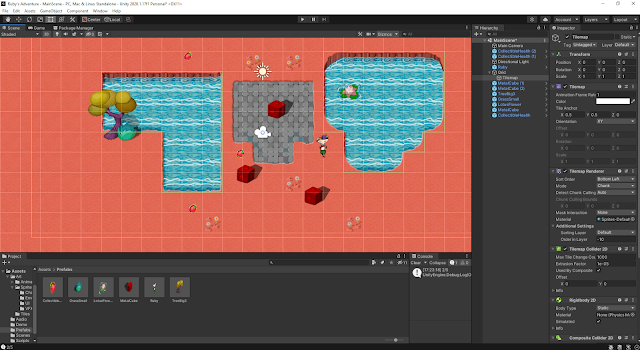
  (image from my unity editor) This week for my unity tutorials I moved on to adding collectibles and  then damage zones and enemies.  For the collectibles part I first gave Ruby a health stat and created new variables, I set Ruby's max health at 5. I then added a new sprite to act as a health collectible and gave it a box collider set as a trigger. Then I created a script for the health collectible to give health to Ruby and also adjusted Ruby's script so that it can check if Ruby needs health. If Ruby's health is at max it wont collect the health collectible. I then went ahead and added a damage zone and also took care of some of the graphics by tiling the sprites instead of stretching them so they look better. I also added enemies with rigid bodies and box colliders. I also created a new script for them called EnemyController. I then used OnCollisionEnter2D to be able to have Ruby take damage when colliding with enemies. I found these tutorials to be quite straight for...

Reading 03

Image
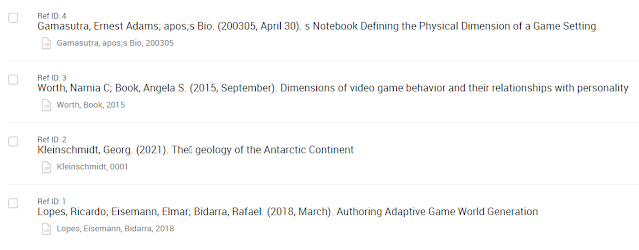
  (image taken from RefWorks of my 4 readings) This week for my reading that I had to find and select 4 academic papers on my topic, dimensions of a game world. I searched through quite a few papers and found 4 that I would focus on this week and saved them in RefWorks. I made sure to read the abstracts and conclusions so that the papers are relevant to my topic. I'm still finding it a little difficult to find some suitable papers but the ones I've found so far are similar enough to what I'm looking for. They are: Defining the Physical Dimension of a Game Setting - Ernest Adams Gamasutra Dimensions of video game behavior and their relationships with personality - Narnia C Worth, Angela S Book The Geology of Minecraft - Georg Kleinschmidt Authoring Adaptive Game World Generation - Ricardo Lopes, Elmar Eisemann and Rafael Bidarra I went through these 4 papers highlighting what I found to be important and commenting the main points I took from the papers. I then go...

Unity Tutorial 02

Image
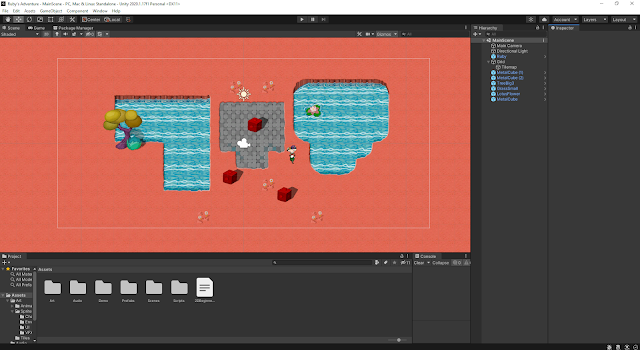
(image of my game in unity) This week for my unity tutorials I had a bit of extra work since I kinda slacked on my work last week so this week I had to catch up 😓 but overall I found the tutorials quite easy to start and go through and it was fun exploring the 2d side of Unity. I remember being interested in sprites and this type of game style a few years ago so I'm excited to learn how these game types are made and how to make my own.  Some of the things I've done so far are include setting up the unity editor to work in making a 2d game. I then went ahead and made my first character and script, character controller and keyboard input and then also worked on the world design, specifically the tile maps which i had to read over twice to get how to paint them on the map 😴 but I managed in the end.  Then I went on to decorate the world with more sprites and set colliders so that the character can interact and be blocked by certain objects.

Planning

Image
  (image  source ) For this week as part as our reading task we were introduced to how the TUD library search works and how to use it to find sources for our chosen topic. I found this very useful as it will make finding sources and reading much easier for my topic. My chosen topic for this game design and development book we all want to create together is "Dimensions of a game world", which would go under the chapter of "Game World".  Some of the Keywords that I found for this topic would be:  Dimension Data Map Navigation Scale These keywords were useful in searching journals, papers and books in the TUD Library search. After searching for some time I started to organize my finding using a matrix. I'm still not sure if I like the current matrix I'm using so I will probably look for a new one. I'm looking forward to learning more about how to create academic writing and use it well as it is a valuable skill to have especially in later studies when the c...

Tech Task Sidebar Box

 Hey guys! Just added a new html widget to my sidebar, a few words of wisdom 😂go check it out!

Unity Tutorial 08

Image
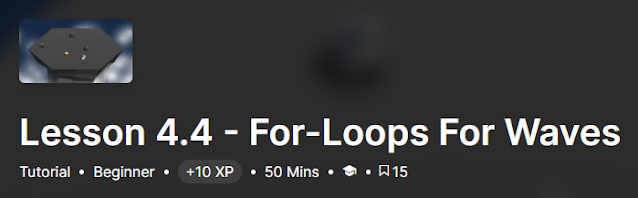
(image describing lesson 4.4,  source ) This week for our Unity Tutorials, I completed lesson 4.4. and had a shot at Challenge 4 In lesson 4.4 I started off by writing a for-loop to spawn 3 enemies as to challenge the player more and also gave it a parameter so that the number of enemies can increase as game goes on. I then wrote up some code to destroy enemies when they fall off and spawn a new wave once a wave is destroyed. I then increased the enemyCount so that the amount of enemies increase with each wave. To finalize the game I spawned powerups with each new wave to help the player. For challenge 4 I was given broken code for a game where the player controls a ball and has to get other balls in your net. Here are the problems with the code which I had to fix: - Hitting an enemy sends it back towards you - A new wave spawns when the player gets a powerup - The powerup never goes away - 2 enemies are spawned in every wave - The enemy balls are not movin...

Review Week Comments and Feedback

Image
  (image showing comment boxes,  source ) Reading through the feedback I have received through my blog comments I am quite happy and there is a lot of good quality in them! I find the comments that make me question more aspects of my game and also give me ideas. Reading through the comments I was inspired to add some things to my game like changing it up from subway surfers with a storm/tornado theme while also making the game winnable instead of just a high score. I also found it interesting that a few people are making a similar endless runner game and I'm happy to hear that some of the links and resources I've posted in my blog was helpful to them :) When it comes to me giving out feedback I believe I've done well so far and gave useful feedback. I really enjoy using the TAG method to give feedback where I tell, ask and give. I find it to be a great method as I can first appreciate something my colleagues have made and then also make them question aspects of their game a...

Unity Tutorial 07

Image
(image showing Unit 4 - Gameplay Mechanics tutorial details,  source )   In this weeks unity tutorial I started the Unit 4 tutorials where we go over gameplay mechanics and make an arcade style sumo battle where the player has to knock enemies off a floating island. In lesson 4.1 I first created the project and opened the scene. I then set up the player and added a texture to the player. I then created a focal point for the camera and coded it so that the player can rotate the focal point of the camera. I then gave the player a forward and backward force and set it to move in the direction of the focal point.  In lesson 4.2 I added an enemy and gave it a physics material to make it bounce away. I then created a script so that the enemy will follow the player. I then also made a spawn manager for the enemies and set their span point randomly.  In lesson 4.3 I chose and prepared a powerup for the player. I set it so that the powerup gets destroyed on collision with the...

Prototype

Image
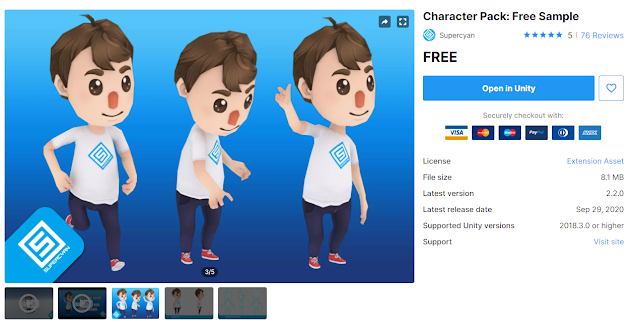
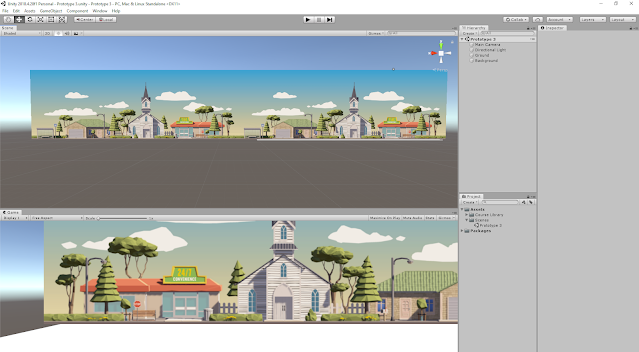
  (image of character pack on unity,  source ) This week I started on my prototype and I first went looking for some assets I could use in my game. I found the above free character pack in unity which also includes the animations I need for the game like running and jumping. I also looked for a map that I can keep repeating in the game. I found something which works but I'm not sure if it will be my final map I use for the game. It is found at this  link . Another thing I found in the asset store was an Endless Runner sample game that is completed and I got that asset so I can use it as a point of inspiration and help if I get stuck in the future. The game asset is found at this  link . I then wanted to focus on my player movements and I found a tutorial that went over the movements of a character in an endless runner. It is found at this  link . I made the character run, jump, go left and right which as the movements he'll need in the game. I took my time with ...

Unity Tutorial 06

Image
  (image of lesson 3.4 on my unity editor) For my Unity tutorials this week I completed lesson 3.4 and also tried challenge 3. I was quite happy with this weeks tutorials and learned a few interesting things. For lesson 3.4 I learned how to add particles and sound effects. I first added an explosion particle for when the player collides with an object and also customized the particle. I then added a dirt splatter particle for when the player runs and also got it to play only when the player is on the ground and stop when he jumps or dies. I then added some music in the background and also declared variables for Audio clips for my sound effects. I then added sound effects for when the player jumps and also when the player collides with an object to add to the explosion effect. With all those steps completed I was finally finished this game too! For Challenge 3 had to fix a game with similar components to the lessons. The problems with this game where that:      The pl...

Games Decisions

Image
  (image depicting flow theory,  source ) Video In order for the player to be optimally engaged, challenges should be presented at a level equivalent or slightly higher than their current skill. Not too easy, not too hard”( Gigity McD ) The word 'flow state' was coined by Csikszentmihalyi (1975) also known as being “in the zone” This is when the player is fully engaged in the game experience. Csikszentmihalyi put a lot of work into observing and analyzing various groups of people. This theory is focused on the idea of how people should balance their skills and the demands of particular tasks. An example of Flow would be a challenge in a game that interests the player such as a puzzle or a boss battle meant to keep the player interested and not get bored. Csikszentmihalyi also states that flow is related to an ideal psychological condition when a person engages in a challenge-skill activity, often resulting in concentration and a focused emphasis on a task. A practical techniq...

Game Design Document

Image
  (image of my Dundoc design model) This week I started to create my Game Design Document and have wrote up some of the basic things I need to include in it. Starting off I was a bit lost on what to write but I was able to get through it by using a template on Dundoc and looking at other examples to get a better understanding. having to write the Game Design Document gave me a clearer end goal and direction to my game where I was able to define things such as the characters back story and some more way to add a twist to the game such as actually being able to win the game if you get far enough from the tornado. The link to my Game Design Document can be found  here .

Unity Tutorial 05

Image
  (image of my unity editor at the start of lesson 3) This week for my unity tutorials I started and completed lesson 3.1, 3.2 and 3.3. In these lessons I started to create a new game. I found them to be fun tutorials and enjoyed completing them and learning new things. In lesson 3.1 I was introduced to the game and what I would accomplish by the end. I created a new prototype folder in my create with code folder and got started. I chose and set up my character giving it a rigid body and a box collider while also making a player control script. I then made the character jump at the start and whenever the player presses spacebar. I then tweaked the jump force and gravity to make the jump look better and more realistic. I also added a condition to stop the player from double jumping. I then made an obstacle and a spawn manager to spawn them at random intervals. In lesson 3.2 I learned how to make the world zoom/whiz by. I first created a script to repeat the background and then I res...